
Set up your profile and notification preferences
Completion requirements
In the top right corner of this page, click on the down arrow next to your name and select Preferences. From here you can change your settings.
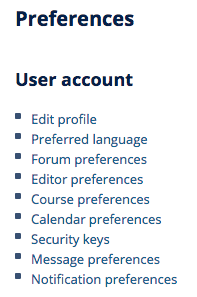
1. Click "Edit profile": Enter information about yourself. Click "Update profile" to save your settings.
- upload a User picture
- list Additional names and Interests.
2. Click "Forum preferences": All communication in the course will occur via three online forums. To lessen the amount of email from the course site, it is recommended that you change your Forum preferences to the following:
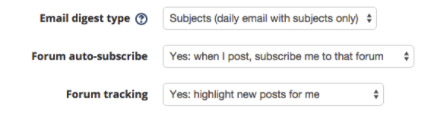
This will ensure that you receive only a single “Daily Digest” email of activity on the following three course forums:
- News Forum: General news and announcements from the course director and support staff. Posts will be distributed to all students. If any posts in this forum are listed in your “Daily Digest” email, please log in to the course site and review the post.
- Q & A Forum: A place for students to post questions about course logistics or course content. General questions about lectures or readings should be posted here. Any student can start a new discussion at any time. The forum will be monitored daily by course faculty. Posts will be distributed to all students.
- Assignment Forum: Each weekly module contains a separate “Assignment Forum”. This is where students should post their weekly assignment, feedback to peers and responses to peer feedback. Students can view all posts but can only reply to posts of students within their assigned small group. Please review your “Daily Digest” email to see if other students or faculty have commented on your assignment and if so log in to the website to view the full post and respond.
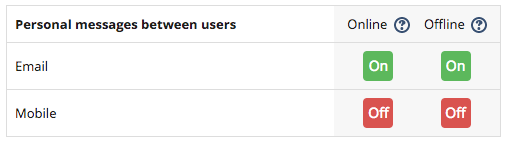
3. Click "Message preferences": Configure your message preferences as follows to ensure you receive messages when you are not logged in
More info: View and Edit your CLE Preferences
Last modified: Thursday, September 5, 2019, 5:33 PM