ctitle() option using outreg2

ctitle() option using outreg2

by Andrea Elser -
Number of replies: 4

Hi everyone,

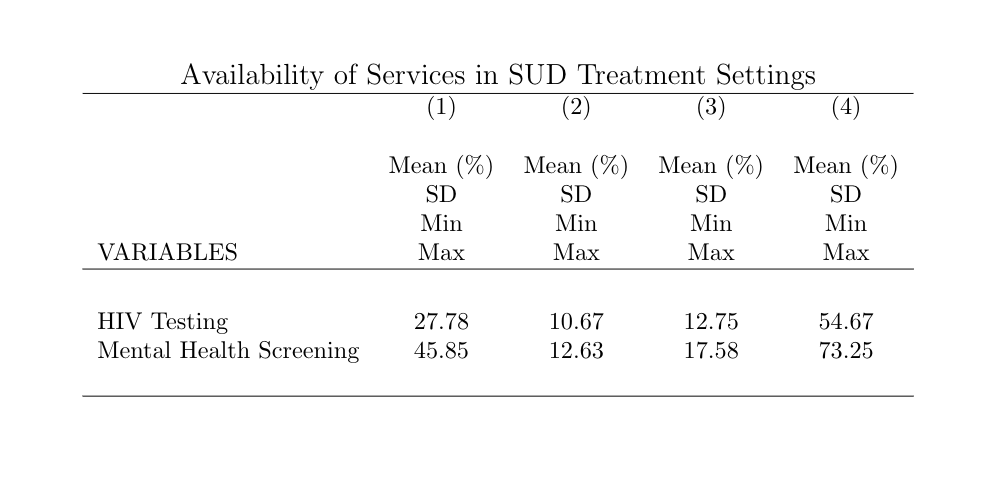
I'm using outreg2 to export a summary table, but when I try to use the option ctitle() it uses all the column titles on all the columns and doesn't remove the "VARIABLES" title. I've tried separating with commas, semi-colons, and spaces, as well as not using quotes. Maybe this is an issue because outreg2 was designed for regression ouput? 

Thanks!

Code:

outreg2 using StateAverages, replace sum(log) dec(2) label ///

keep(StateAverageHIVpct StateAverageMHpct) eqkeep(mean sd min max) ///

ctitle("", "Mean (%)", "SD", "Min", "Max") ///

title(Availability of Services in SUD Treatment Settings) tex(pretty)
table

In reply to Andrea Elser

Re: ctitle() option using outreg2

by Kristen -

I think you use semi-colons to separate column titles in outreg2: 


ctitle(list) column titles; comma separated for each additonal row; semi-colon for each additional column; use quotes if comma is part of title. Example: ctitle("Wage, Participation","Wage: Participation"). To specify empty column title, specify ctitle(" ").

(from help file)

In reply to Kristen

Re: ctitle() option using outreg2

by Andrea Elser -

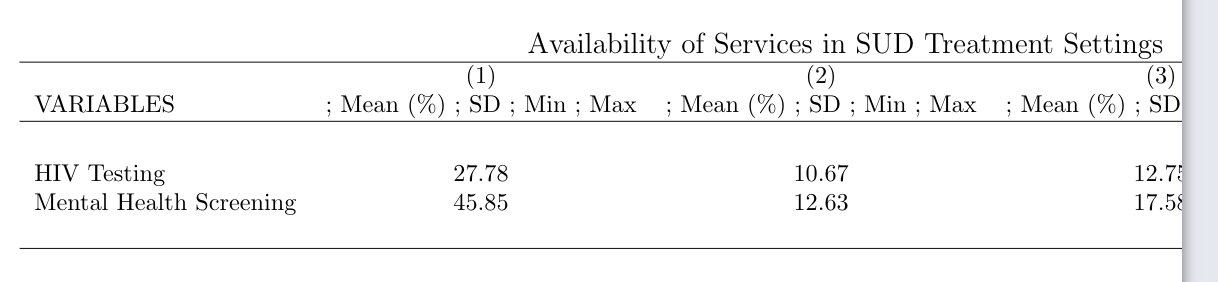
I tried that, it doesn't work either and the table gets cut off in overleaf:

outreg2 using StateAverages, replace sum(log) dec(2) label ///

keep(StateAverageHIVpct StateAverageMHpct) eqkeep(mean sd min max) ///

ctitle(" "; "Mean (%)"; "SD"; "Min"; "Max") ///

title(Availability of Services in SUD Treatment Settings) tex(pretty)table

In reply to Andrea Elser

Re: ctitle() option using outreg2

by Atul Kumar -

Can you email me your do file and the database.

Atul.Kumar@ucsf.edu