
(Edited by Michael Kohn - original submission Thursday, August 27, 2020, 3:01 PM)
I was working on Assignment 5 and was unable to save the "Subjects Count By Race" query because of a message "You do not have exclusive access to the database at this time. Your design changes will not be saved.". I closed out of Access on My Research and when I tried to log in again, I get this message "The database has been placed in a state by user 'Admin' on machine 'ARS-OFFICE-02' that prevents it from being opened or locked. Any tips on resolving this issue?
Hi Shylaja,
As far as I know, there is nothing you can do in normal Access operation that would cause this error. I've only seen it when working in remote environments (like MyResearch). In other words, it looks like a glitch on the server, which you could not have avoided.
I'd try to fix it in this order:
- Using the MyResearch file manager (and with MyResearch Access *closed*), look for a file in your folder called [youraccessfilename].laccdb. If you find it, delete it. Do NOT delete any files that have the extension .accdb!! - Then try again to open your file in Access on MyResearch.
- If that doesn't work, contact ARS support ( its-arssupport@ucsf.edu) and tell them what happened. Be sure to give them your folder name and the name of the database that got stuck.
Fortunately you started Assignment 5 right away so there's plenty of time to get this sorted. Sorry for the inconvenience. Let us know how that works.
As far as I know, there is nothing you can do in normal Access operation that would cause this error. I've only seen it when working in remote environments (like MyResearch). In other words, it looks like a glitch on the server, which you could not have avoided.
I'd try to fix it in this order:
- Using the MyResearch file manager (and with MyResearch Access *closed*), look for a file in your folder called [youraccessfilename].laccdb. If you find it, delete it. Do NOT delete any files that have the extension .accdb!! - Then try again to open your file in Access on MyResearch.
- If that doesn't work, contact ARS support ( its-arssupport@ucsf.edu) and tell them what happened. Be sure to give them your folder name and the name of the database that got stuck.
Fortunately you started Assignment 5 right away so there's plenty of time to get this sorted. Sorry for the inconvenience. Let us know how that works.
Hi Shylaja
Did u get resolution? I am also getting same error.
Did u get resolution? I am also getting same error.
Hi Sujatha- Yes, my issue is resolved. As Dr. Kohn said, it was probably because I had more than one Access file open. MyResearch kept freezing for me and I kept having to log back in which must have caused the problem. Hope you are able to figure it out too!
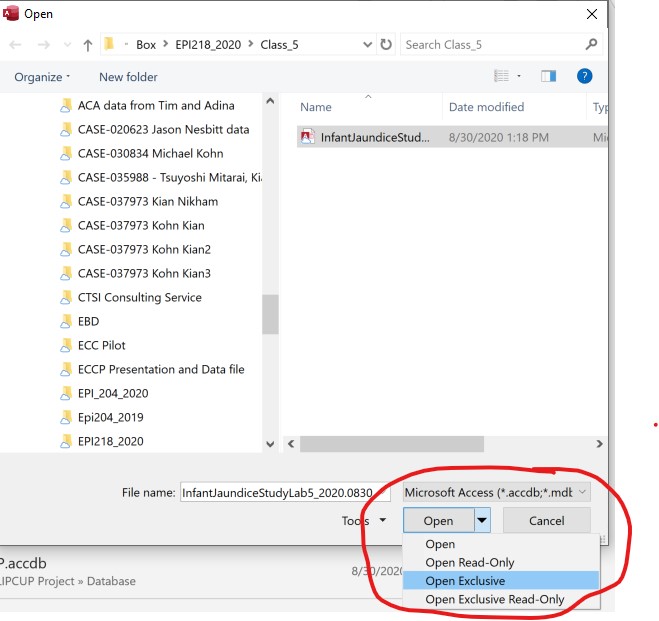
You have opened Access twice. Close all copies of Access. Then "Open Exclusive" as shown above.
If two people have the same Access file open, or if one person has opened the same Access file twice, it won't allow you to save design changes.
This is one reason why we split multi-user Access databases into front- and back-ends. I can make and save design changes to forms and reports in my copy of the front-end while you continue to enter data in your copy of the front-end. Both front-ends connect to the same back-end data tables because we don't want people working with different copies of the back-end data tables.
If two people have the same Access file open, or if one person has opened the same Access file twice, it won't allow you to save design changes.
This is one reason why we split multi-user Access databases into front- and back-ends. I can make and save design changes to forms and reports in my copy of the front-end while you continue to enter data in your copy of the front-end. Both front-ends connect to the same back-end data tables because we don't want people working with different copies of the back-end data tables.