table1 user-generated command

table1 user-generated command

by Abigail Cortez -
Number of replies: 9

Hello! 

Just have a question about using the table1 function. It saves the table as an xls file, which I can then open in Excel, but is there a way to then export the table from Excel to Word without just copying and pasting for our final submission? Or can table1 export directly to Word? I've pasted the table into Word from Excel and retained the formatting and it looks ok, but thought I should check in about this. 

I found that table1 was useful for doing a mixture of categorical and continuous variables, so I would like to stick with it if possible!

Thanks!

- Abby


In reply to Abigail Cortez

Re: table1 user-generated command

by Amanda Irish -
Hi Abby,

It's fine to just copy and paste from excel into word. Unfortunately table1 only exports to excel. We just want to make sure you can get your data out of Stata directly, whether that's into word directly or excel first.

Hope that helps!
In reply to Amanda Irish

Re: table1 user-generated command

by Shu Li -

How about table1_mc?

In reply to Shu Li

Re: table1 user-generated command

by Amanda Irish -
Same. This goes for any user-generated command - fine to use, and OK if they don't export directly to word.
In reply to Amanda Irish

Re: table1 user-generated command

by Sarah Goldberg -
when I export with table1_mc, it seemed to export a lot more data than was displayed in stata. Is it ok to just copy over the columns that I need to word?
In reply to Sarah Goldberg

Re: table1 user-generated command

by Amanda Irish -
Can you be a little more specific? What data is displayed in the excel vs. Stata?
In reply to Amanda Irish

Re: table1 user-generated command

by Sarah Goldberg -

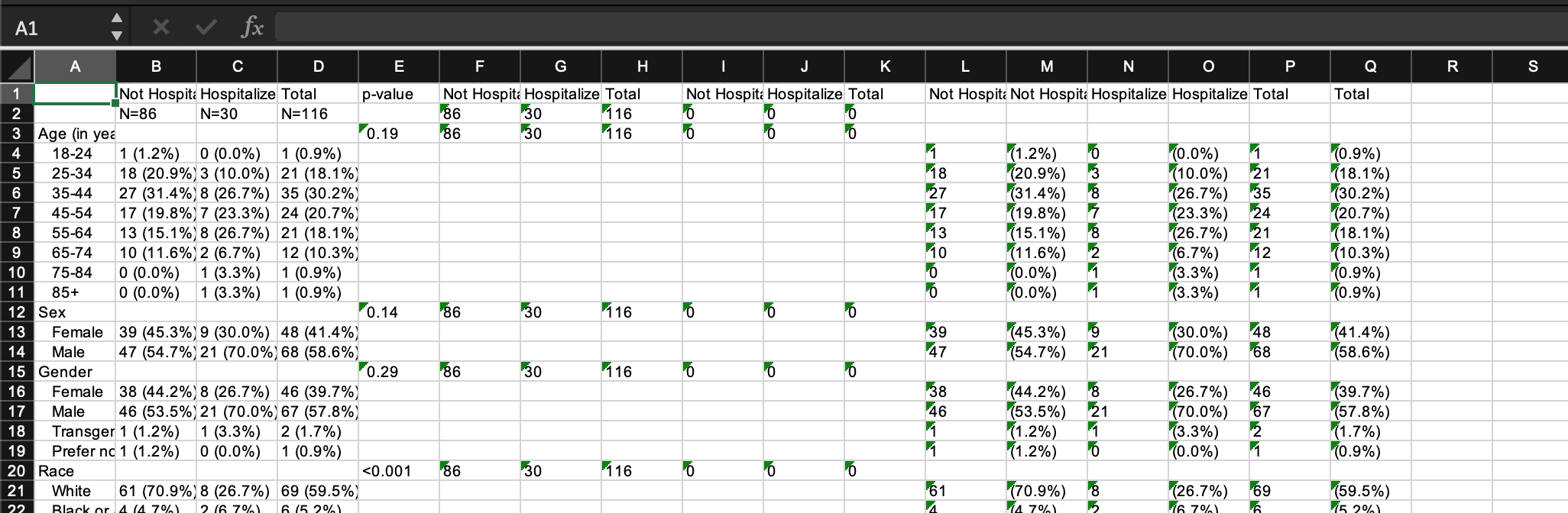
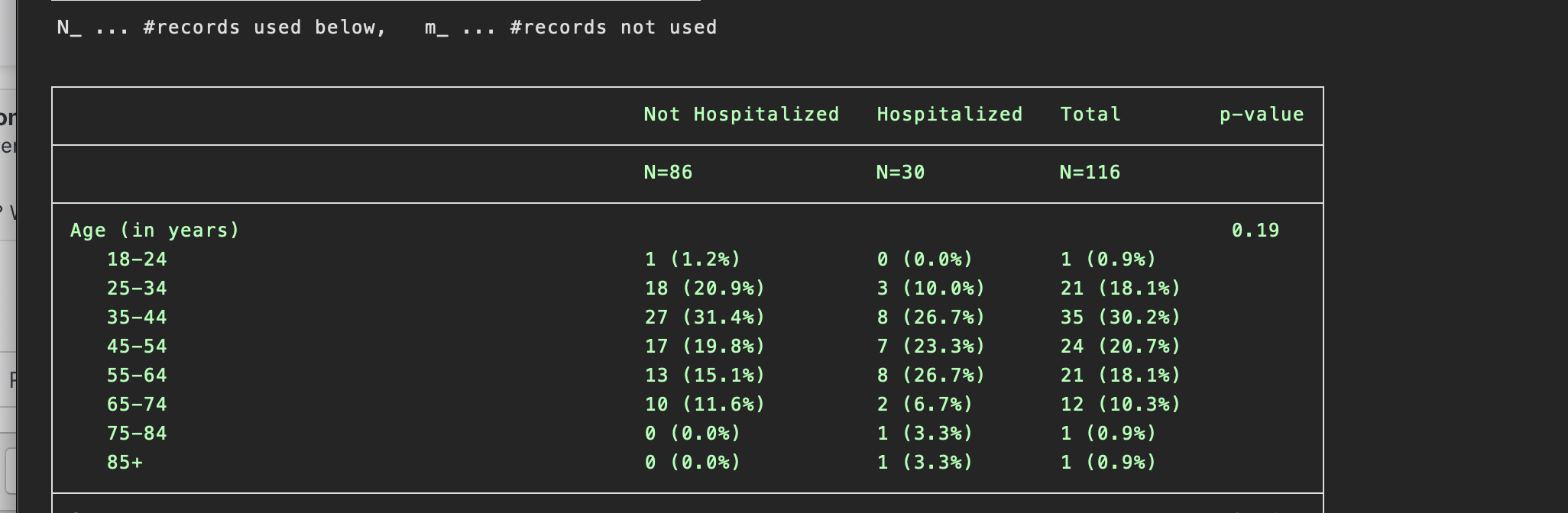
I've included two photographs here to show the difference. There seems to be more columns. It appears that it displays it as N and % combined (columns B-D) and then also separates them into separate columns(columns L-Q). I was just wondering if I could copy the columns of interest over to word - especially since I do not want to display p-values either.

Attachment Screen Shot 2020-09-12 at 8.00.46 PM.png
Attachment Screen Shot 2020-09-12 at 8.01.30 PM.png
In reply to Sarah Goldberg

Re: table1 user-generated command

by Amanda Irish -
I see - thanks for providing the additional info. It looks like the way the command works to export is to export the "combined" info that you would want to include in your publishable table in the first 4-5 columns (depending if you want to include a p-value - as you are correctly pointing out, it's not technically considered correct to include p-values in table 1s these days) and then the N and percents spread out individually across the other columns. Anyway, bottom line is, yes, it's fine to just copy and paste the columns you would like to use in your final table from excel into word. It would be a good idea to note that you're doing that as a comment in your Stata do-file also.
In reply to Amanda Irish

Re: table1 user-generated command

by Sarah Goldberg -
Also if we're using table1_mc, are we allowed to add the table title and footnote in word (not in Stata). It does not seem that table1_mc allows you to title, footnote, etc.
In reply to Sarah Goldberg

Re: table1 user-generated command

by Amanda Irish -
Yes, again, any additional formatting beyond just exporting the data is fine to do in Word.